Overview
Greenway Intergy is the Electronic Medical Record system for Arizona Asthma and Allergy Institute. It is a traditional client-server, fat-client type of application. One of the main components is the Transcription Writer. This piece of software is heavily integrated with Microsoft Word an uses and Add-In to communicate back and forth.
Troubleshooting
When users have trouble with Transcription Writer, follow these troubleshooting steps:
- Check if user account is signed in and authorized in Microsfoft Word. Any issues with the O365 account not signing-in or authorizing will cause issues with the Transcription Writer.
To Fix:
Check that the status of the O365 account in Microsoft Word is logged in and authorized. Often issues are caused because their 2FA token has expired and then need to sign out and back in.
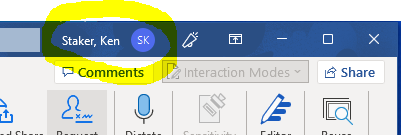
If there is an issue, have the user sign in with their O365 account including 2FA, then close Microsoft Word and relaunch Transcription Writer.
- Transcription Writer requires a .dot template installed in the user profile and a registry setting (more details on these configurations are in the sections below). Any issues with these will cause the templates to not show up or the Quick Texts to not be available.
To Fix:
Run the batch file \\aaai-fs01\AAAI-Software\Installers\Intergy\Add-IntergyFixes.bat as administrator.
This batch file should fix all Transcription Writer setup issues and can be run multiple times without hurting anything.
Transcription Writer - Autotext or Quicktext list is not complete, missing templates, disk space or memory issues
Please use the attached file (or the network copy which is updated more regularly at \\AAAI-STORAGE\AAAI-Software\Tools\Fix-TranscriptionWriter.bat) to fix the issues below automatically. Run Fix-TranscriptionWriter.bat as an administrator and then reboot the machine.
---DEPRECIATED---
When entering text into transcription writer, the users leverage the Microsoft Word Autotext feature.
If items are missing from the Autotext list, you can copy the Normal.dot file from a machine that is working.
The file is in the following location:
C:\Users\<common username>\AppData\Roaming\Microsoft\Word\startup
**************
User reports that the autotext's that are shared throughout the organization are not available on one PC. This issue is caused by a missing configuration in Microsoft Word. To fix:
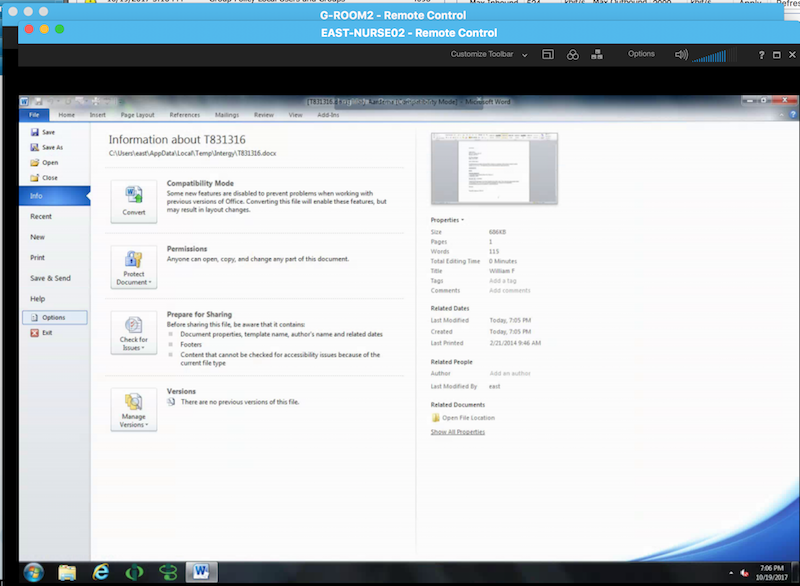
Log into Intergy Transcription Writer. Once in Microsoft Word, click on the File menu and select Options.
Select Template from the list box at the bottom of the screen and click OK.
Add an entry for Normal.dot and link to the network file \\aaai-mail\users\startup\normal.dot
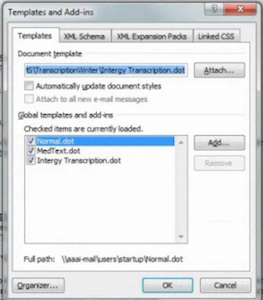
Save and restart Transcription Writer.
Transcription Writer - Macros missing
If the macros are not enabled in Transcription writer, the normal.dot add-in needs to be enabled.
Open Transcription Writer (which just launches Microsoft Word).
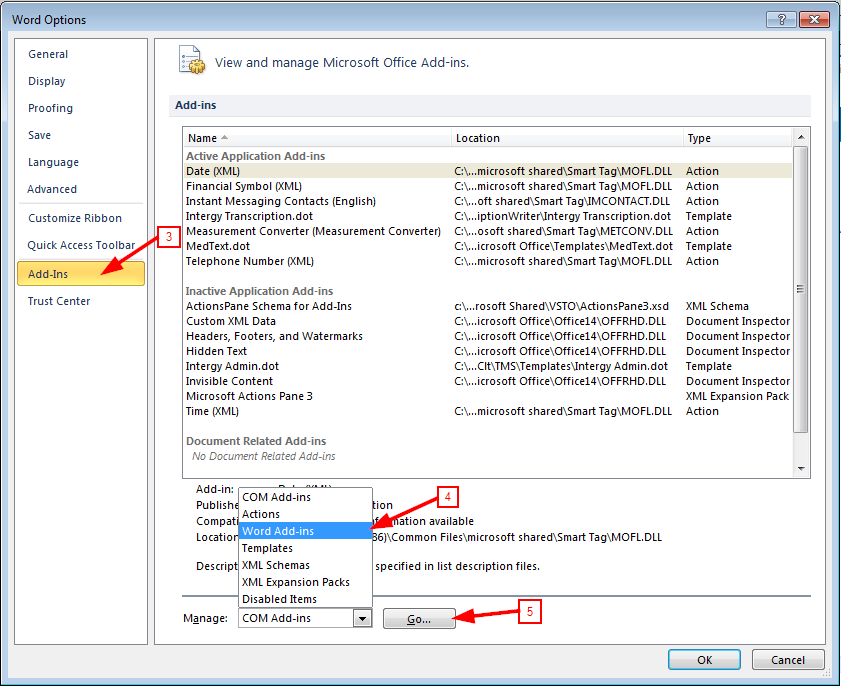
Click on File->Options.
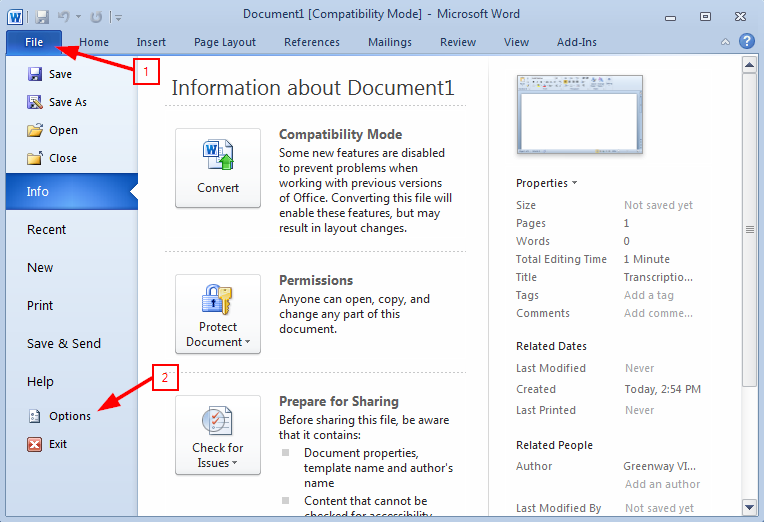
Select Add-Ins > Click the Manage drop-down > Select Word Add-ins > Go.
The Templates and Add-ins window will open. The template Intergy Admin.dot will be unchecked by default. Add a check to the checkbox and make sure the Normal.dot has a checkmark next to it then click OK.
If you do not see Intergy Admin.dot, then you will have to click Add, and navigate to C:\Intergy\Code\UI\Clt\TMS\Templates. Select Intergy Admin.dot. Once it's added to the list, add a check to the checkbox and click OK, as shown below.
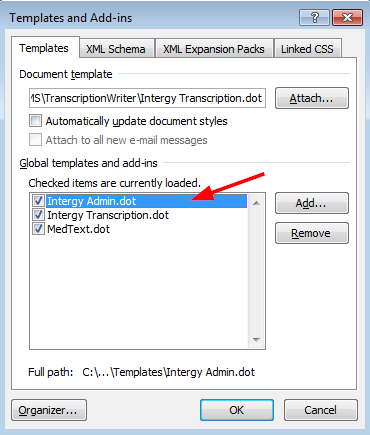
Clicking OK will enable the MailMerge toolbar. Depending on your security settings, you may be prompted that Macros have been disabled. You will need to click Enable Content in order to create or edit templates.
Transcription Writer - Merge Document Templates missing
This error is due to a registry entry not being set correctly.
This is likely an edit to the following registry setting:
HKEY LOCAL MACHINE > Software > Wow6432Node > Medical Manager Research & Development > Intergy > Transcription.
or
HKEY LOCAL MACHINE > Software > Medical Manager Research & Development > Intergy > Transcription.
Typically this is by default C:\Program Files\Microsoft Office\Templates..
However some sites change this to their shared location for all users to use the same templates.
MUST BE SET TO: T:\ (the mapped network drive for templates)
Transcription Writer - No default directory, cannot save
Greenway Intergy Transcription Writer requires that the C:\Intergy\Trans directory exists for the Transcription Writer software to save files. You can create the directory manually if it does not exist. Creating the directory will also enable the default value to show up.
There is insufficient memory or disk space. Word cannot display the requested font.
Use the attached "Fix-Transcription-Writer.cmd" and reboot after.
TRANS or INTTRANS Temporary Directory
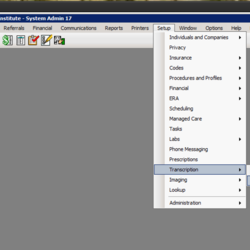
A transcription gets written out to a temporary file at the "Approve" step of the process. If the specified temporary directory does not exist the step will fail. Here are the screenshots of where to configure the Temporary directory location.
Was this article helpful?
That’s Great!
Thank you for your feedback
Sorry! We couldn't be helpful
Thank you for your feedback
Feedback sent
We appreciate your effort and will try to fix the article